




If you have purchased a travel medical plan through Insubuy before, buying the same plan again can be as easy as building on information from your previous purchase instead of starting over.
Buying new coverage should not require you to complete another application from scratch, especially when you have found a travel medical insurance plan that matches your coverage needs. Express Repurchase, an Insubuy MyAccount feature, lets you buy the same travel medical insurance plan again in just a few steps.
How Can I Repurchase Travel Medical Insurance Faster?
A faster repurchase starts with less repetitive data entry. Express Repurchase reuses your verified application details, allowing you to spend less time entering information and more time reviewing the details that matter.
Instead of entering the same information again, you can focus on reviewing your application. Verified information from your previous purchase, including the plan name, number of travelers, home country, and residence, loads automatically. Only the new coverage dates and, when required by the plan, the destination country or date of arrival need to be entered before continuing. If any details have changed since you last bought the plan, simply update them before completing your purchase.
A faster application means less time on repetitive data entry and more time preparing for your trip.
How Do I Repurchase Travel Medical Insurance?
Sign in to your Insubuy MyAccount, then follow the steps to use Express Repurchase.
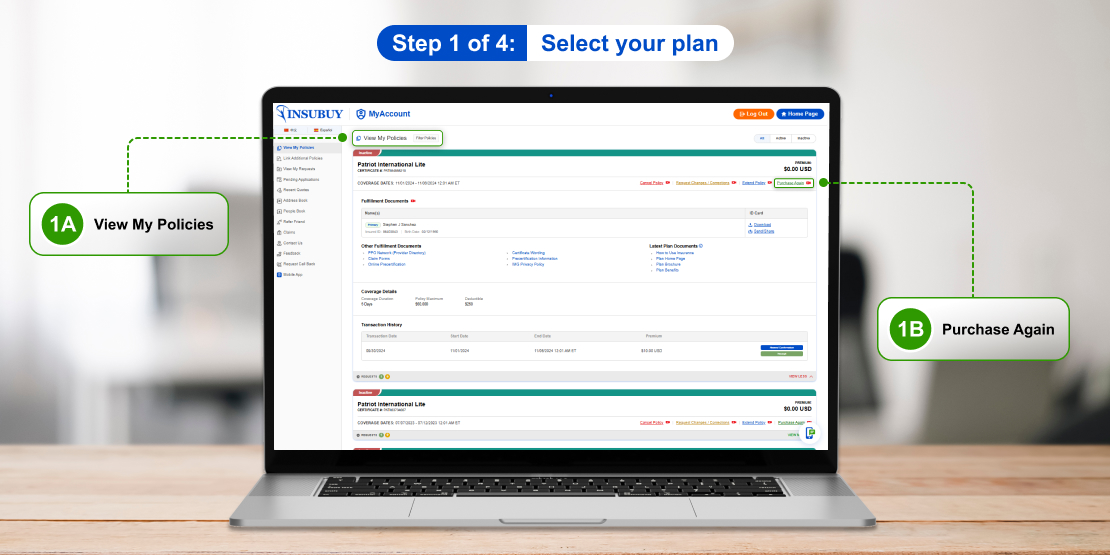
Step 1 of 4: Select your plan
- 1A. On the View My Policies page, locate the travel medical policy you want to repurchase.
- 1B. Select Purchase Again in the upper-right corner of the policy card.
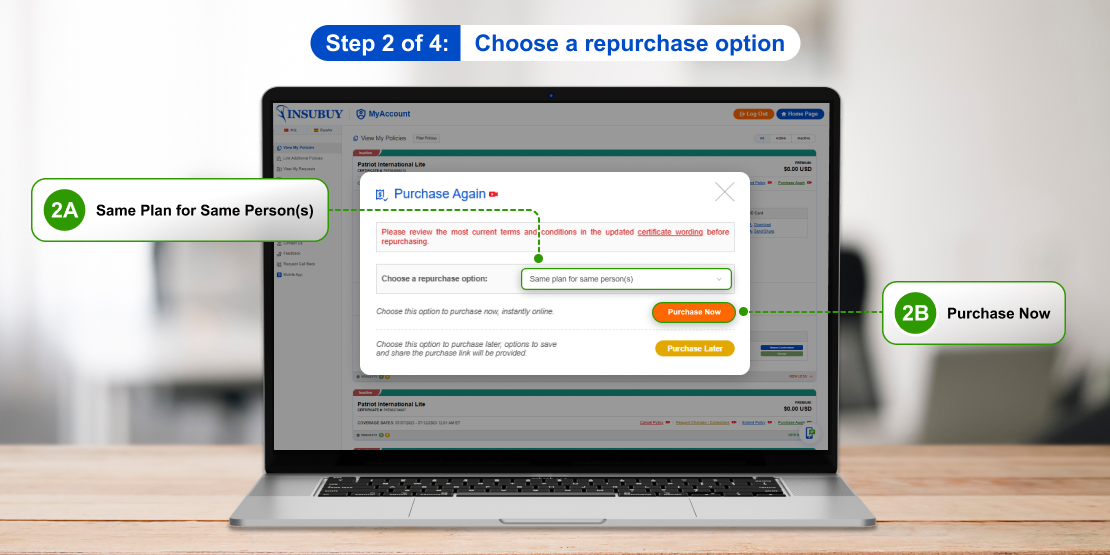
Step 2 of 4: Choose a repurchase option
- 2A. In the drop-down, select Same plan for same person(s) to purchase the same travel medical plan for yourself or the same traveler from the previous policy.
- 2B. Select Purchase Now.
Not ready to continue? Select Purchase Later to save your progress. Send yourself a purchase link so you can return and complete the purchase later.
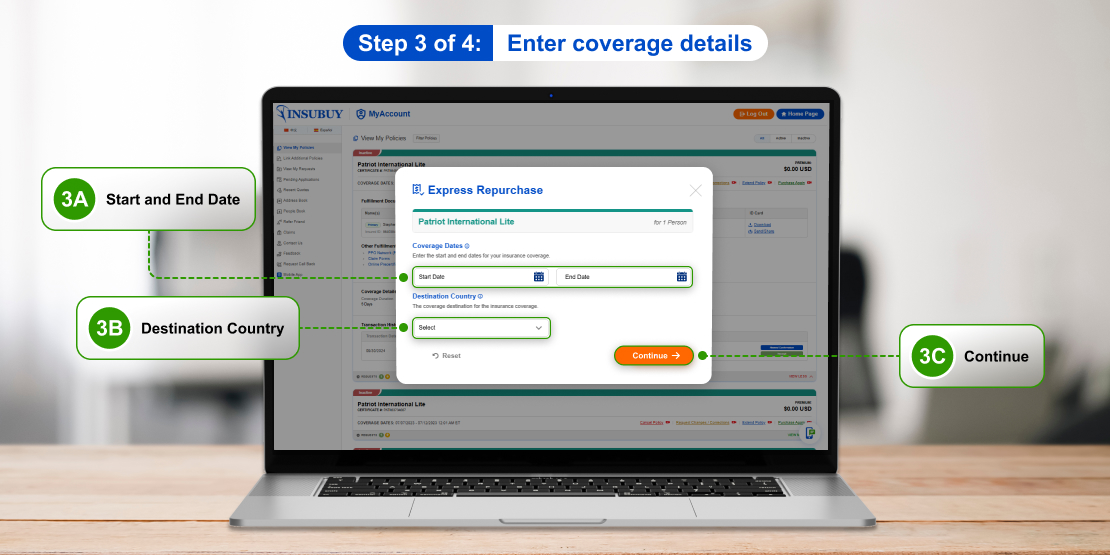
Step 3 of 4: Enter coverage details
- 3A. Enter the new coverage start and end dates.
- 3B. Enter the destination country or date of arrival, when required by the plan.
- 3C. Review the information, then Continue to open the pre-filled application.
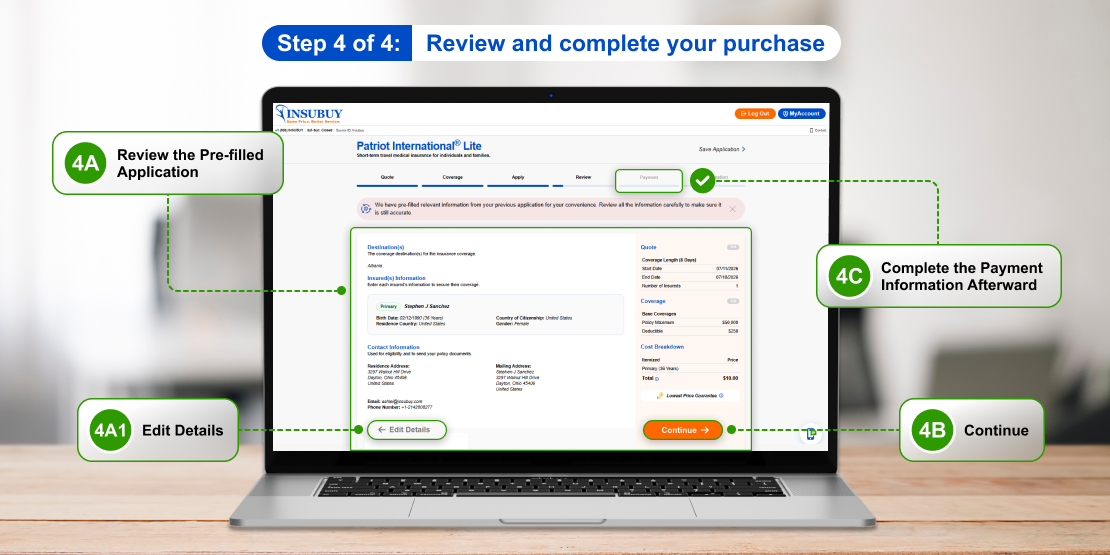
Step 4 of 4: Review and complete your purchase
- 4A. Review the pre-filled application.
- 4A1. Select Edit Details in the bottom-left corner of the page to update any information that has changed.
- 4B. If no changes are needed, select Continue.
- 4C. Complete the payment information and confirm agreement to the required purchase terms.
- 4D. Select Purchase.
After your purchase, you will be redirected to the Confirmation page.
When Is the Best Time to Use Express Repurchase?
Express Repurchase supports multiple types of repeat purchases. Depending on your travel plans, it offers a convenient option whenever you need coverage again.
- Buy the same travel insurance plan again for a future trip when the same coverage continues to meet your travel needs.
- Extend your travel medical plan when your trip lasts longer than originally planned.
- Renew travel medical insurance before your current coverage ends.
Ready to repurchase your travel medical plan? Sign in to your Insubuy MyAccount and use Express Repurchase to get started.
Your Insurance Questions Answered
We're more than just your broker; we're your partner. Get fast answers to nearly any insurance question from our expert agents or use the power of our proprietary database.